
Call Flow Designer is visual administration of Microsoft Teams Phone auto attendants and call queues. It solves a problem most of your customers already have but have rarely put into words: nobody can see how the telephony actually fits together, and every change has to go through IT.
Positioning — say it precisely
Microsoft Teams Phone handles the calls. VoiceQ365 makes the environment visible, manageable and measurable. That distinction matters in a sales conversation: you are not replacing Microsoft, you are making Microsoft usable for the operation.
VoiceQ365 has three areas, and they must be kept apart — including in a pitch.
| Area | What it is |
|---|---|
| Real-time dashboard | Current operational state — queue pressure, offered and answered calls, waiting times, agent availability, capacity. |
| Call Analytics | Historical analysis — call journeys through auto attendants and queues, answer rates, overflow behaviour, outcomes per queue and per agent. |
| Call Flow Designer | Visual administration — configuration of auto attendants and queues, assignment of agents and resource accounts, role-based access. |
Do not merge them. The real-time dashboard and Call Analytics are not the same function. Never present them together as "real-time analytics" — that is a claim the product does not support, and a technical buyer will notice during the demo.
The four arguments that work
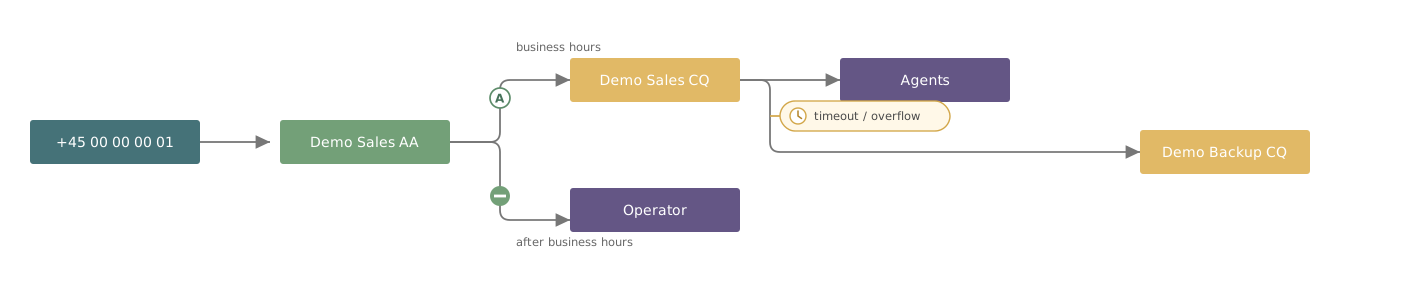
- The structure becomes visible. Number, auto attendant, queue and recipient sit side by side on one canvas with lines between them. The customer can see where a call ends up without opening five objects in the Teams Admin Center. For a customer who inherited a setup from a previous supplier, it is often the first time anyone can answer "what actually happens when someone calls the main number".
- Delegation without broad access. Whoever maintains a queue gets access to that queue. Not to the Teams Admin Center. This is the argument that moves the decision from IT to operations — and that is typically where the budget sits.
- The reason for every connection is stated. Each line on the canvas carries a mark saying why the call takes that route: business hours, key press, timeout, overflow, operator. That makes an audit possible for someone who did not build the setup.
- Dependencies are enforced. The system blocks deletion of a queue referenced by other objects instead of leaving a broken flow behind. A small detail, but it catches a class of error that is otherwise discovered by a customer on the phone.
Who you are talking to
| Role | What occupies them |
|---|---|
| IT manager | Fewer permission grants, fewer support cases, a documented change history. |
| Telephony owner | Seeing the whole setup in one place and troubleshooting without guessing. |
| Customer service manager | Being able to change business hours and agents without waiting for IT. |
| Reception manager | Being able to set up holidays and seasonal closures in advance. |
Boundaries — hold the product lines
Call Flow Designer administers auto attendants and call queues. Broader number management belongs to DDI Manager, which is a separate product. It is not a module, a feature or an add-on to VoiceQ365. Sell it as what it is — otherwise you create an expectation the implementation cannot meet.
Supported connectivity: Calling Plan, Operator Connect and Direct Routing.