
Call Flow Designer is the visual administration of Microsoft Teams Phone auto attendants and call queues in VoiceQ365. It gives you one picture of how a call finds its way from a phone number to a member of staff — and lets you change that route without granting broad access to the Teams Admin Center.
Where it fits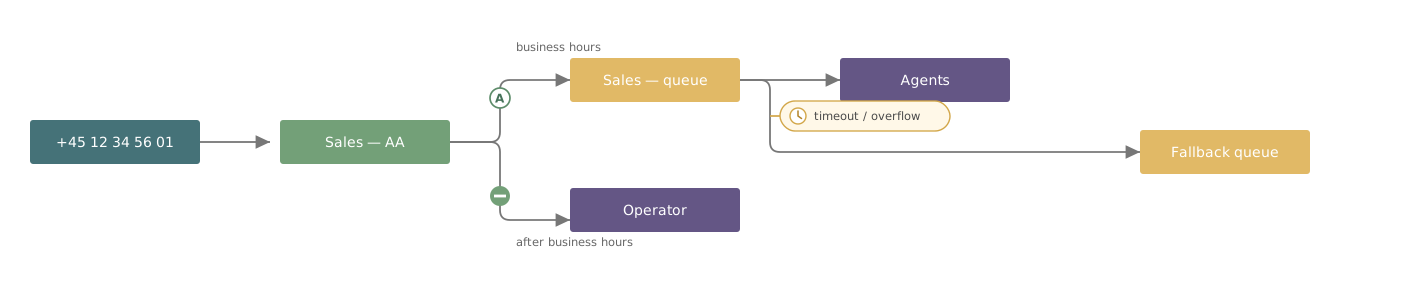
Microsoft Teams Phone handles the calls themselves. VoiceQ365 makes the environment visible, manageable and measurable. Call Flow Designer covers the manageable part: setting up and maintaining the auto attendants and queues your calls run through.
The three areas of VoiceQ365- Real-time dashboard — current operational state: queue pressure, offered and answered calls, waiting times, agent availability.
- Call Analytics — historical analysis: call journeys, answer rates, overflow behaviour, outcomes per queue and per agent.
- Call Flow Designer — visual administration: configuration, assignment of agents and resource accounts, role-based access.
The real-time dashboard and Call Analytics are not the same function. The first shows the current state; the second is historical analysis.
What you gain- The structure becomes visible. Number, auto attendant, queue and recipient sit side by side with lines between them.
- Delegation without broad access. Whoever maintains a queue gets access to that queue — not to the Teams Admin Center.
- The reason for every connection is stated. Each line carries a mark explaining why the call takes that route.
- Dependencies are enforced. An object cannot be deleted while something still points to it.
Calling Plan, Operator Connect and Direct Routing.
Explore this topic
Part 1 of 5 in Getting started
Related articles