
For a complete first workflow, see Complete your first AA & CQ analysis.
Where these numbers liveIn VoiceQ365 Call Analytics, open the report called AA & CQ — AA for auto attendant, the menus, and CQ for call queue. Statistics opens on Direct Routing, which is about trunks and traffic and is not your report.
Two settings first, or everything below is wrongYour time zone. Statistics defaults to UTC. In Central European Summer Time that puts every hour-of-day chart two hours out, and your "busiest hour" will simply be wrong. Set it once in Preferences and it sticks.
Your period. The date control at the top governs every number on the screen, and AA & CQ opens on Whole period — everything the system has ever retained.
For weekly review, use Last 7 days. For anything you intend to compare month to month, use Custom and pick whole calendar months. Comparing a 22-working-day month with a 19-working-day one will show a fall in calls that means nothing at all.
1. Call result outcome — start hereThe chart titled Call Queue calls, per call result outcome splits every call into five categories.
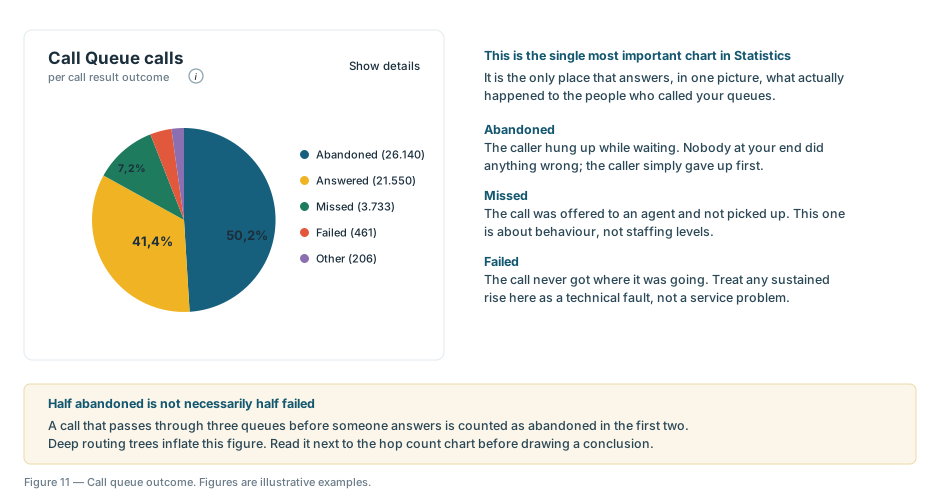 Figure 1 — The call result outcome chart. Figures shown are illustrative examples.
| Category | What actually happened | What to do |
|---|---|---|
| Answered | An agent took the call. | Nothing. |
| Abandoned | The caller hung up while waiting. | Look at waiting time and opt-in ratio. |
| Missed | The call was offered to an agent and not picked up. | This is a behaviour conversation, not a staffing one. |
| Failed | The call never arrived where it was going. | Raise it with IT. This is technical. |
| Other | Everything that fits nowhere else. | Ignore unless it grows. |
The distinction between abandoned and missed is the one people get wrong. Abandoned means nobody at your end had the chance — the caller gave up first. Missed means the phone rang at an agent and went unanswered. They call for completely different responses.
One more caveat before you quote the headline percentage: a call routed through three queues before someone answers is counted as abandoned in the first two. Deep routing trees inflate this figure, so read it next to hop count below.
2. Agent opt-in ratio — usually the explanationOf the agents assigned to your queue, this is the share actually signed in and able to receive calls.
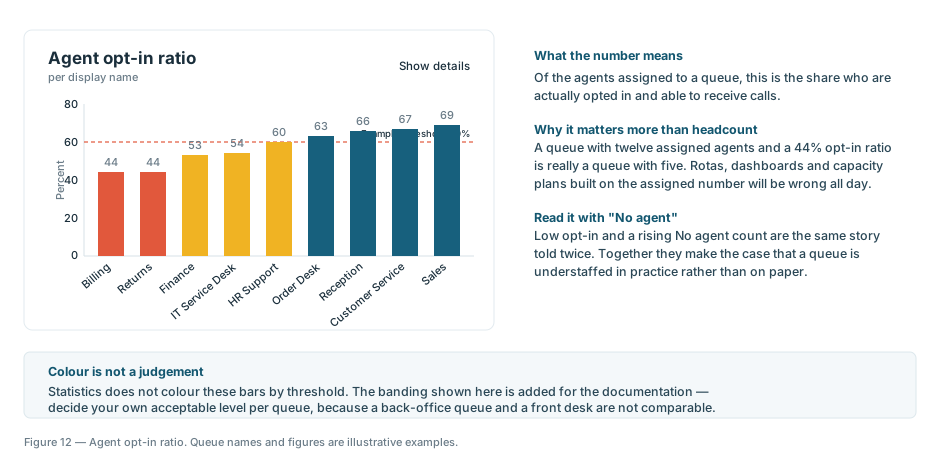 Figure 2 — Agent opt-in ratio per queue. Queue names and figures are illustrative examples.
If your abandoned rate is high and your opt-in ratio is low, you have found your answer and you no longer need to argue about it. Twelve agents on paper and 44% opted in is five agents in practice.
3. No agent — the one with no excusesIn the Key metrics band at the top, No agent counts calls that reached the queue when nobody at all was signed in. Unlike a long wait, there is nothing ambiguous about it and nothing to debate. If this number is not zero during your opening hours, that is the first thing to fix.
One warning about this band: the six outcome tiles do not add up to your call volume. A single call can be counted in several of them — timed out in one queue, transferred, then answered somewhere else. Treat them as six separate questions about the same traffic, not as slices of a pie.
4. Hop count — why callers are irritated before they reach youEvery handover from one menu or queue to the next is a hop. If your queue sits at the end of a long chain, callers arrive having already spent several minutes in the system, and they abandon faster as a result.
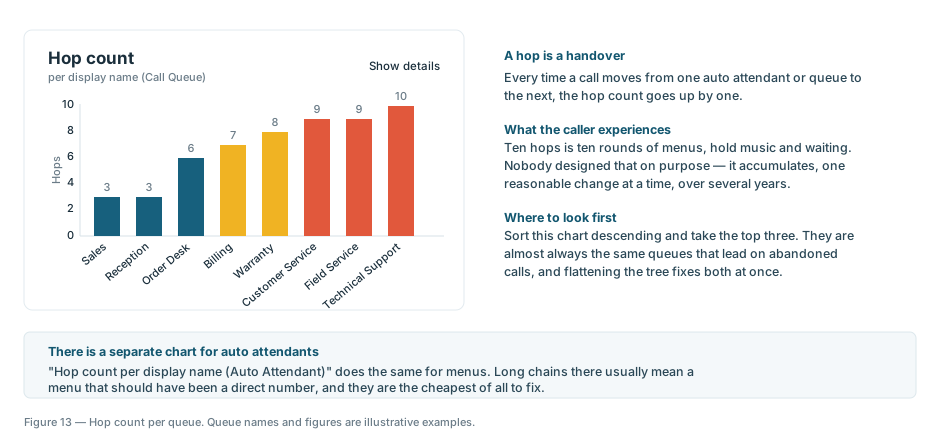 Figure 3 — Hop count per queue. Queue names and figures are illustrative examples.
Sort this chart descending and take the top three. They are almost always the same queues that lead on abandoned calls, and flattening the routing tree tends to fix both at once.
A ten-minute weekly routine- Set the period to Last 7 days.
- Read the call result outcome chart. Has the abandoned share moved?
- Check No agent. It should be zero.
- Check agent opt-in ratio for your queue against last week.
- If anything looks wrong, find the specific calls behind it before you raise it.
That last step is what makes the difference. Walking into a conversation with three specific calls and their timestamps is a different thing entirely from walking in with an impression.
Already a customer? Sign in to read how to filter to your own queue and save it as a view, and how to find the individual calls behind any number.