
Naming
Objects appear in dropdowns as Name (Ivr) and Name (Queue), mixed in the same list. Agree a naming standard with the customer on day one — for example Department - Function. In an environment with thirty objects it is the difference between five seconds and five minutes every time someone has to pick a target.
Always build both call flows
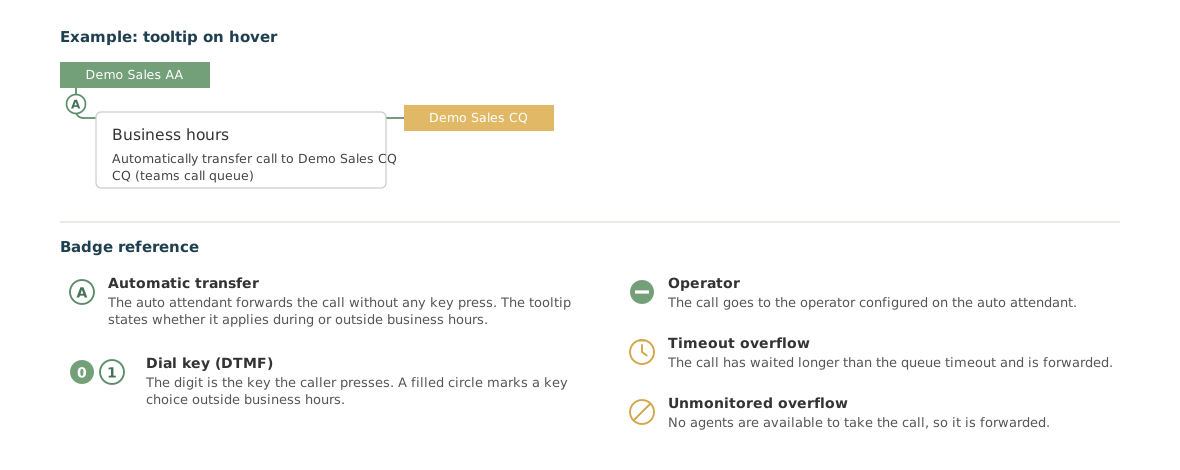
The most common omission in inherited environments is a missing After business hours callflow. It produces no error message — calls are simply treated the same around the clock. Make it a fixed item on your checklist.
One reserve queue per customer
Point all three failover situations at the same reserve queue from the start. It gives the customer one place to look when something overflows, and it is easy to refine later. The alternative — three different targets per queue — becomes unmanageable by the fifth queue.
Delegate at handover, not afterwards
Set up Administration while you are in the environment. If you do not, the customer ends up calling you to have a business hour changed, and you have neither sold the self-service nor been able to invoice it.
Check the synchronisation timestamp before troubleshooting
If someone has changed something directly in the Teams Admin Center, the canvas is not necessarily up to date. The timestamp sits above the canvas with a refresh button. It is the fastest way to avoid a wrong conclusion.
Deletion requires cleaning up first
An object cannot be deleted while something points at it. The panel removes the Delete button and explains why. Use the canvas to find the references: click the object and see which lines run into it. See Dependencies and deletion.