
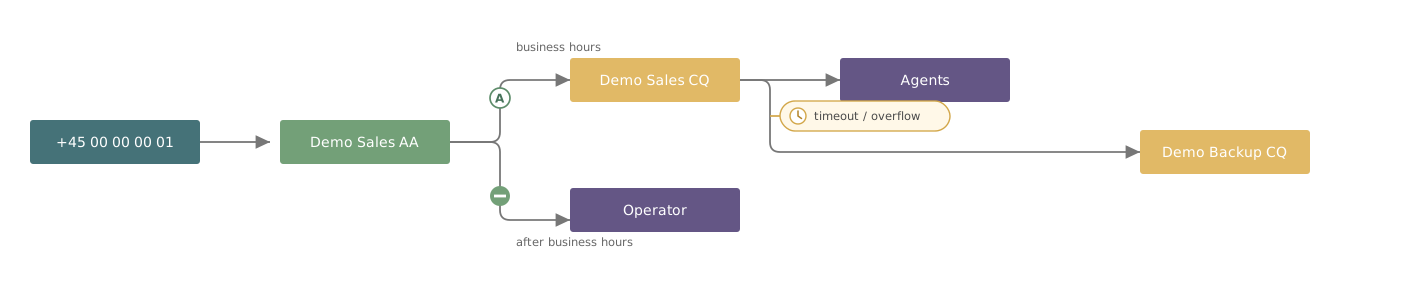
When someone calls your main number, a series of things happen automatically. Perhaps they hear a welcome message. Perhaps they have to press 1 for sales. Perhaps they end up in a queue, and if nobody answers within a minute, something else happens. All of that is set up in advance — and that is what you can see and change here.
What you can do yourself
You do not need to call IT to:
- Change opening hours, including temporarily
- Enter public holidays and seasonal closures in advance
- Add or remove staff from a phone queue
- Change what happens when nobody answers
- Change the welcome message or the hold music
- See exactly where a call ends up
You have access to precisely the lines and queues your organisation has made you responsible for. You cannot change other people's — and that is deliberate.
What still belongs to IT
Creating new phone numbers, connecting the number to the carrier, and giving other people permission to edit. The telephony itself is run by Microsoft Teams — this is the layer on top that makes it understandable and changeable.
How to get in
- Sign in to Coherence. Use the link and login you have been given. If in doubt, ask whoever handles IT.
- Choose VoiceQ365 in the menu at the top. You get two tiles to choose between.
- Click Callflow Management. That is where the overview of your phone lines lives. The other tile, Realtime Dashboard, shows how busy things are right now — that is a different thing and not covered by this guide.