Six situations from a mixed, international number estate. Each is described with the situation, the setup and what you gain.
1. User numbers in an estate where not everything is Teams
The situation. The Danish range of 100 numbers contains all sorts: Teams users, a handful of queues, three lines on the old switchboard and a porting that never completed. During onboarding, administrators pick "the next available one" — and sometimes get it wrong.
The setup. Create the label "DK · Users" with the Users capability. Assign the numbers that may genuinely be given to employees.
How it is used. At onboarding the administrator goes to DDI Ranges, filters on Available and searches for DK · Users. The result is available numbers approved for the purpose.
The gain. The choice becomes a lookup instead of a guess. A new colleague — or an external partner — has a documented basis to assign from without knowing the history.
2. Numbers reserved for call queues and auto attendants
The situation. The main number and a handful of neat, memorable numbers are earmarked for support queues and switchboard menus. In Teams they hang on resource accounts — but until they do, they look like any other available number.
The setup. Create the label "DK · Queues & attendants" with the Call Queues and Auto Attendants capability, and assign the selected numbers.
How it is used. When a new call queue has to be created, you search for the label and immediately find the numbers set aside for the purpose.
The gain. The "good" numbers are visibly reserved for service functions. You avoid the situation where an easy number is already sitting on an employee's phone.
3. Numbers that live on another platform
The situation. Part of the German range still terminates on a legacy PBX. The numbers do not exist in Teams, so the Microsoft Teams admin center cannot warn anyone. In DDI Manager they show as available — and a colleague can assign one of them to a Teams user, after which calls start going wrong.
The setup. Create the label "DE · Legacy PBX" with the No assignment capability and assign every number that is active on the old platform.
How it is used. The numbers remain documented in the shared database, but are clearly marked as occupied by another system. If a number later moves to Teams Phone, you simply clear the tick in the number picker.
The gain. This is the core of the master data layer idea: numbers that do not exist in Teams are nonetheless visible and clearly marked where the administrators are looking. A number range can be created in DDI Manager whether or not it is used in Teams Phone — so purely legacy ranges can come along too.
4. Migration in waves
The situation. The legacy platform is to be retired over four quarters, department by department. Along the way each number is in one of three states: still on the old platform, mid-move, or finished in Teams Phone. Nobody can remember which.
The setup. Three labels with the same No assignment capability, distinguished by name: "DE · Legacy PBX", "DE · Migration wave 2" and "DE · Migration wave 3". Numbers are moved between labels as the waves progress, and removed entirely from No assignment labels once they have landed in Teams.
How it is used. At each status review the project manager searches for the label name in E.164 assignments and reads the count in the "Showing 1 to N of N entries" line. Progress shows up as a falling number of numbers still carrying a migration label. The figure is noted manually — labels are not included in the Excel export.
The gain. The migration plan lives in the number database instead of in a project spreadsheet that has not been updated since the last meeting.
5. Several countries, several carriers, several tenants
The situation. You have numbers in three countries, each with its own provider and its own connectivity type. An external partner administers the German tenant. Nobody has a combined picture of how many numbers are left where — and the country units must not assign from each other's ranges.
The setup. One label family per country with the country code first: "DK · Users", "SE · Users", "DE · Users" and the equivalent for queues. Labels are created under the Customer the country belongs to.
How it is used. Searching for SE · shows the entire Swedish part of the estate regardless of range. Combined with the Available filter, "what do we have left in Sweden?" becomes a single lookup instead of a round of emails.
The gain. The estate can be read country by country in one lookup. The provider's portal is still the source for orders, porting and invoicing, but the partner works from the same naming convention and the same data, within the tenants and roles you have granted access to.
6. Quarantine after a departure
The situation. A salesperson has left. The number has been released in Teams, but customers are still calling it. If it is passed straight to a new employee, they inherit calls that were never meant for them.
The setup. Create the label "DK · Quarantine — release 2027-01" with the No assignment capability. Put the number on the label when it is released.
How it is used. The numbers in quarantine sit together in one place. At a periodic review you remove the numbers that have been there long enough, and they become assignable again.
The gain. An otherwise unwritten rule becomes something the system remembers — and something any colleague can see and follow.
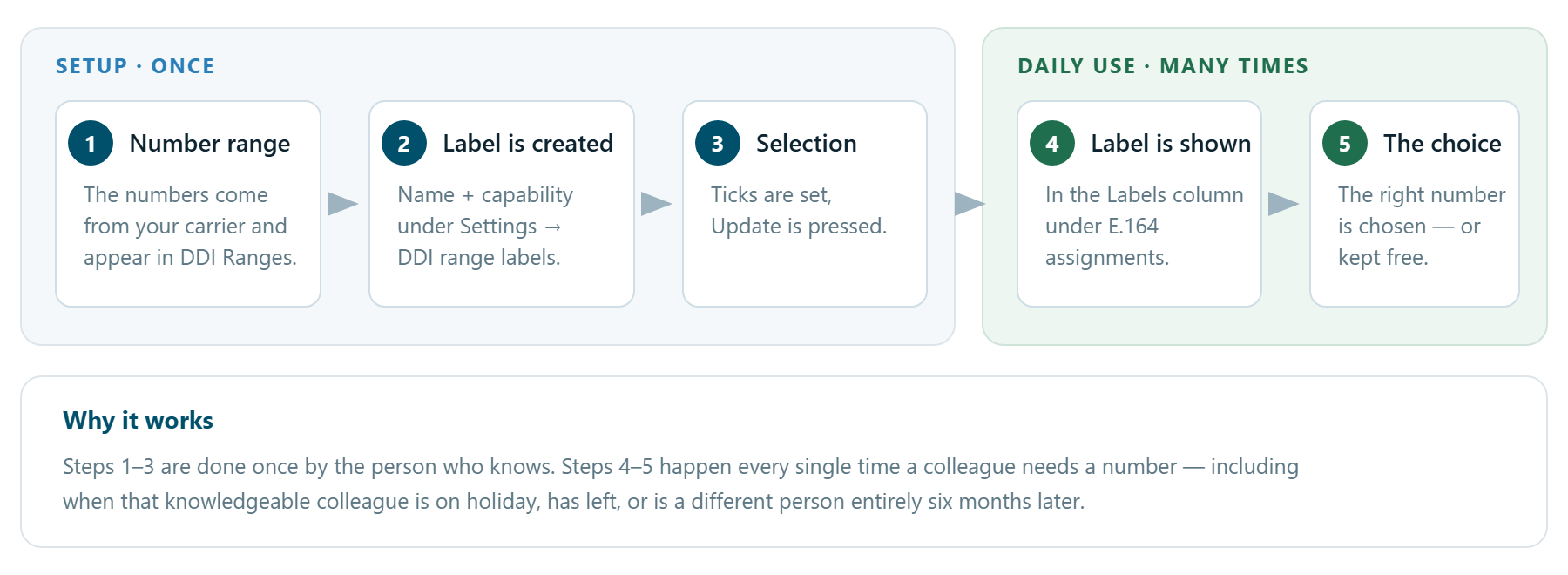
How it fits together