DDI Manager | Phone number management for Teams Phone Skip to content


DDI Manager for Microsoft Teams Phone

Bring phone numbers, user configuration and number history together.

When phone numbers are managed across spreadsheets, scripts and separate systems, it becomes difficult to keep number ranges, reservations, assignments and history together. DDI Manager gives organisations one structured workflow for their own phone numbers, while partners can use the same workflow across customers.
Reserve phone numbers and see how they were previously usedAssign phone numbers, calling policies and relevant licences
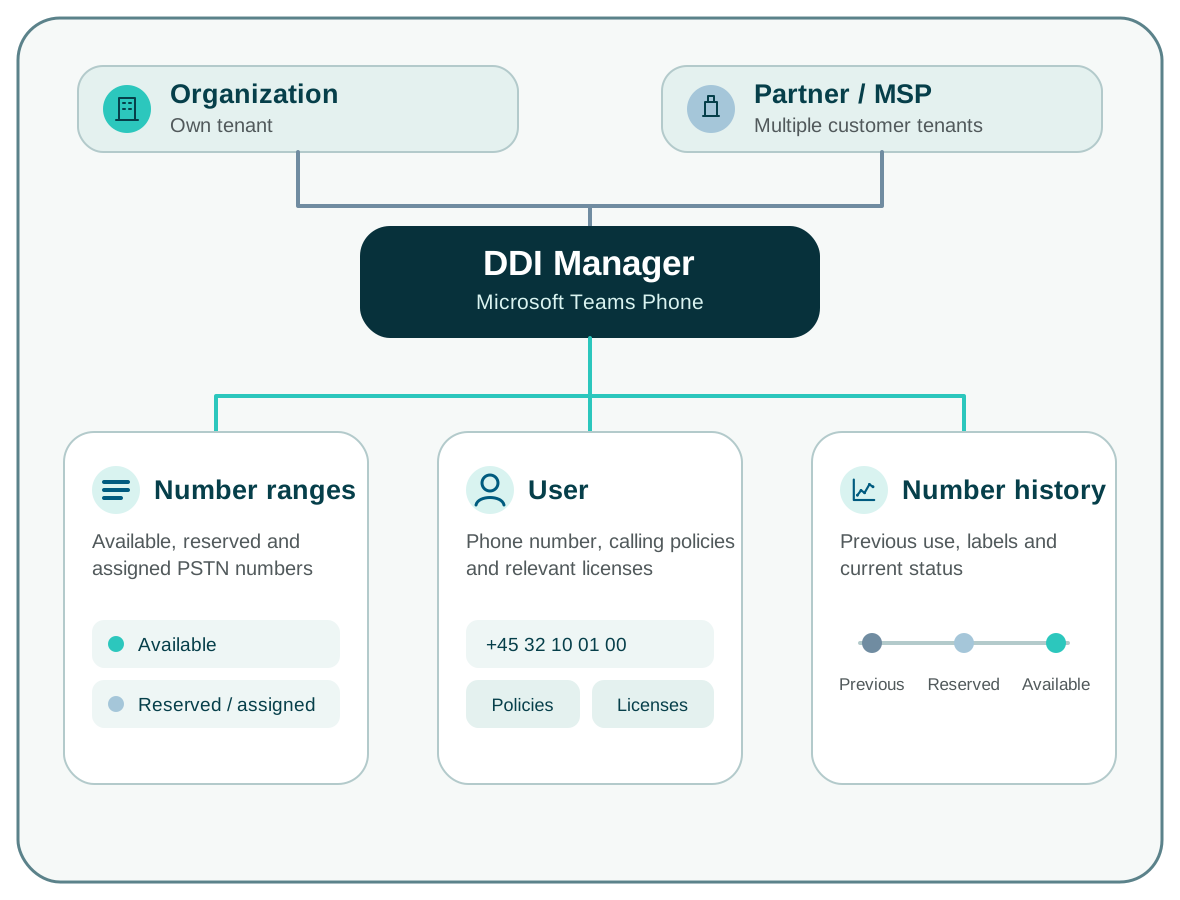
DDI Manager brings together number ranges, users and number history for organisations and partners

When information is spread across systems

A phone number does not tell the whole story.

Microsoft Teams admin center shows which phone numbers are currently used in Teams Phone. Information about number ranges, operators, reservations and previous use often sits in spreadsheets or local lists, making it difficult to maintain one complete overview.

01

Which phone numbers are available?

View available, reserved and assigned phone numbers across number ranges and locations.

Find a phone number without comparing multiple lists.

02

Who is assigned this phone number?

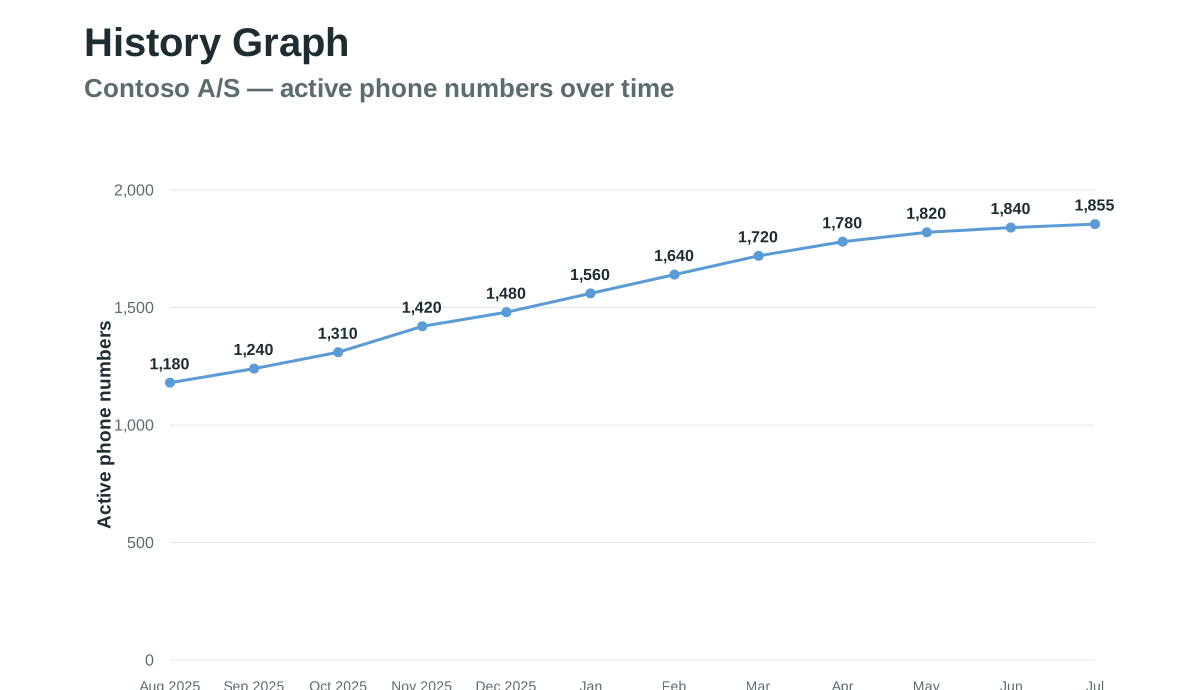
See which user a phone number is assigned to and how the number was used previously.

Retain the history when users change.

03

How should the user be configured?

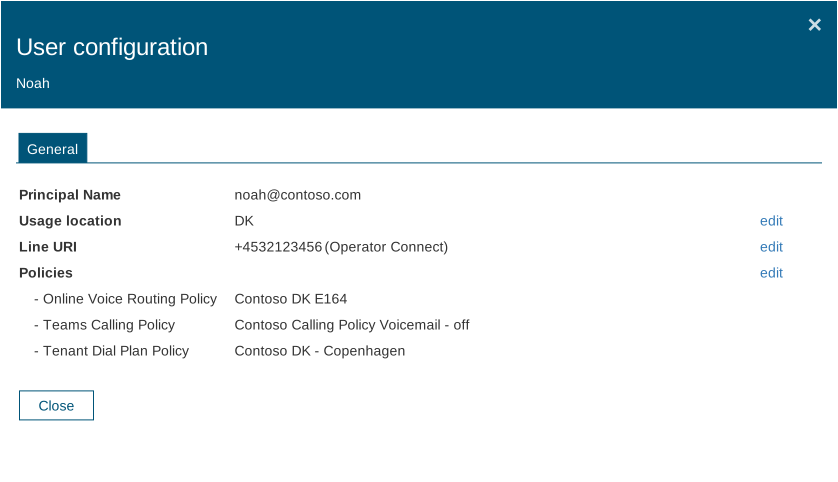
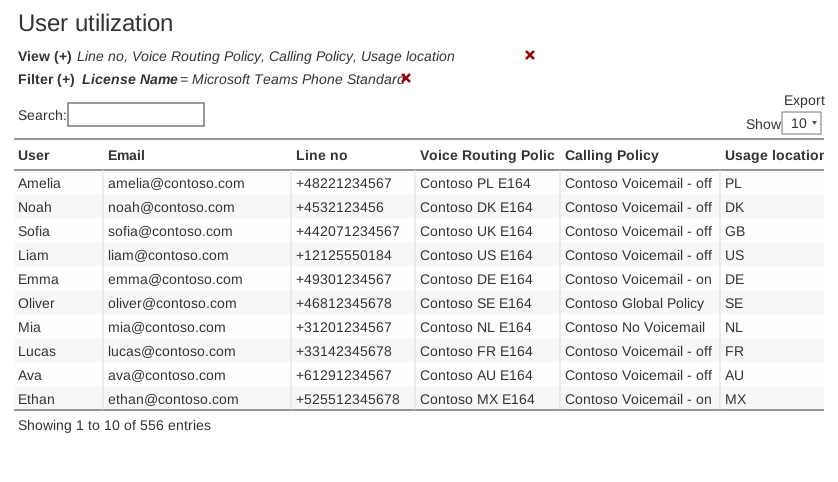
Manage the phone number, calling policies and relevant licences in the same workflow.

Handle the change in one place.

A single workflow

From available number to user phone setup.

DDI Manager collects the administrative steps around the phone number. When Entra ID workflows are configured, changes can follow user group membership.

01

Find the right number

Search among available numbers and see the number ranges, operator and location.

Look where the number belongs.

02

Book or assign

Book the number for later use or assign it to the relevant user.

Keep reservations and allocations separate.

03

Calling policies and licences

Assign the ring policies and licences applicable to the user.

Collect changes in one workflow.

04

Release the number again

Remove the allocation by offboarding and keep the history of the previous use of the number.

Prepare the number for a new assignment.

DDI Manager in practice

Find the number, assign it and retain its history.

DDI Manager connects three related tasks: maintaining an overview of number ranges, assigning phone numbers, calling policies and relevant licences, and retaining the history of each number.

DDI - Ranges Contoso (EN) - compact
Number ranges

View number ranges, operators, labels and phone number status: available, reserved or assigned.
Two ways to use DDI Manager

Manage your organisation’s own phone numbers – or numbers for multiple customers.

Organisations bring phone number and user administration together. Partners select a customer in Coherence and then use the same workflow. DDI Manager supports Microsoft Calling Plans, Operator Connect and Direct Routing.

For organisations

Bring phone numbers and users together

View available, reserved and assigned phone numbers. Use the same process when employees join, change roles or leave.

For partners

Manage phone numbers for multiple customers

Select the customer in Coherence, then work with that customer’s phone numbers and users.

RackPeople uses DDI Manager

How RackPeople manages phone numbers for customers and partners.

“How many phone numbers are there? Which employees have which numbers? Which numbers are available? It may sound simple, but finding a solution that provides an overview as clear as DDI Manager has been difficult.” — Lasse Thorning Pedersen, CEO · RackPeople

01

Select a customer or partner

RackPeople selects the customer or partner in Coherence. DDI Manager then displays only the phone numbers and users for the selected organisation.

02

Manage the phone numbers

View phone number status, assignments and history. Reserve available numbers and assign them to users.

03

Retain the history

The number history is retained when a phone number is released and later reassigned.

04

Continue to the next organisation

Once the task is complete, RackPeople selects the next customer or partner in Coherence and continues with the same workflow.

Features and practical details

Frequently asked questions about DDI Manager

What can DDI Manager be used for?

DDI Manager brings together the administration of available, reserved and assigned fixed-line phone numbers. It works with your existing Microsoft Teams Phone setup and complements the administration tools provided by Microsoft and your telecom operator.

DDI Manager does not replace Microsoft Teams Phone, your telecom operator’s systems or the existing PSTN connection.

How does DDI Manager support onboarding and offboarding?

When the workflow is configured, Microsoft Entra ID groups can support the allocation and clearing of phone number, ring policies and relevant licences when users start, change their role or stop.

Which Teams Phone connectivity options are supported?

DDI Manager can manage phone numbers in tenants with Microsoft Calling Plans, Operator Connect and Direct Routing. The actual setup depends on your phone architecture.

Can partners manage multiple customers?

Yeah. Partners can choose the relevant customer tenant through Coherence. Telephone numbers, users and number ranges are kept separate between customers.

Can phone numbers be reserved and labelled?

Yeah. A telephone number can be reserved for later use and provided with labels and relevant metadata.

Can we see how a phone number was used previously?

Yeah. DDI Manager retains history so that you can see who or what the phone number has been previously assigned.

Does DDI Manager replace Microsoft Teams admin center or the telecom operator’s systems?
No. Microsoft Teams Phone and the telecom provider continue to be used for their respective parts of the telephone. DDI Manager brings together the overview of phone numbers and number ranges - including operator, labels, reservations and history - and allows for the management of allocations, relevant licences and ring policies from the same location.

Next step

See DDI Manager in practice

See how to bring phone numbers and number ranges into one overview, manage assignments and retain number history – for one organisation or multiple customers.