Coherence · for Microsoft partners, MSPs and telecom operators
Manage Teams Phone across customers after signing in once.
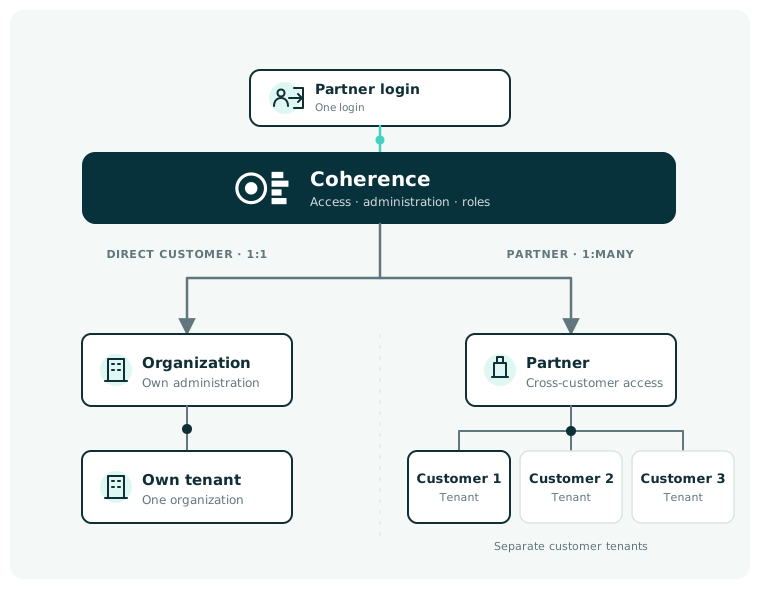
With Coherence, users sign in once and select a customer. They can manage phone numbers and call flows, monitor current call activity and use historical call data without signing in separately for every customer.
Coherence works with each customer’s existing Microsoft Teams Phone setup.
When multiple customers need support
Supporting more customers should not require a different workflow for each one.
When users switch between customer logins, administration tools and local lists, the work becomes dependent on specialists and local knowledge. Coherence brings customer selection and product access together so teams can use the same workflow across customers.
Switch between customers after signing in once
Select a customer in Coherence and continue directly to the products and Teams Phone tasks available for that customer.
Limit access by task
Give users access to the customers, products and functions required for their work.
Use the same workflow across customers
Manage phone numbers and call flows, monitor current activity and use historical data in the same way for every customer.
What you can deliver
Support consistent Teams Phone operations across customers.
Manage phone numbers and call flows, monitor current activity and use historical data to understand trends and plan ahead.
A partner that understands the Microsoft ecosystem.
Performance Metrics has always understood the adaptations we have needed. They have extensive expertise in the Microsoft ecosystem and turn that knowledge into real value for us and our customers.
Nils Petter BrokstadBusiness Development ManagerTelenor Norway
Performance Metrics has cracked it. We spend almost no time on maintenance or preventing outages because the system runs reliably.
Lasse Thorning PedersenCEORackPeople
FAQ
Frequently asked questions about partner workflows.
Can we work across multiple customers’ Microsoft 365 tenants after signing in once?
Yes. Partner employees sign in to Coherence, select the customer and open the products and functions they are authorised to use for the selected Microsoft 365 tenant.
How do we add a new customer?
A new customer is set up in Coherence with the agreed products and access. Relevant employees can then select the customer after signing in.
Can we work across multiple customers’ Microsoft 365 tenants after signing in once?
Yes. The partner's employees sign in to Coherence, select the customer and open the products and functions they are authorised to use for the selected Microsoft 365 tenant.
Partner conversation
See how Coherence fits into your service delivery.
We start with the customers and Teams Phone tasks you already manage. Then we show how users select a customer, open the relevant products and complete their tasks in Coherence.